Best Microsoft Forms Alternative

Microsoft Forms is a solid basic tool included with Microsoft 365, but it has limited customization and analytics. FormBuilder is a standalone platform with AI-powered generation, 25+ field types, conditional logic, and a full analytics dashboard — no Microsoft subscription required.

Try FormBuilder Free
No credit card required
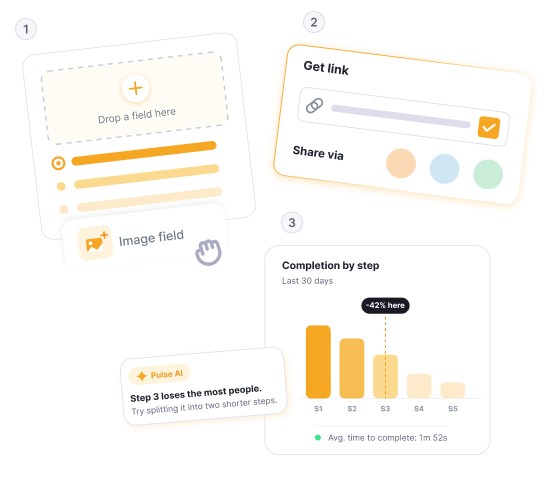
FormBuilder drag-and-drop form editor with 25+ field types

Why Choose FormBuilder Over Microsoft Forms

A dedicated form builder with advanced features — no Microsoft 365 subscription required.

Platform icon

Fully Independent Platform

Microsoft Forms requires a Microsoft account for creators and locks AI features behind a Copilot license. FormBuilder is fully standalone — sign up with any email, use AI form generation out of the box, and share forms with anyone. No accounts required for respondents.

AI icon

AI Without the Extra License

Microsoft Forms' Copilot AI requires a separate license on top of Microsoft 365. FormBuilder includes AI form generation for all users — describe your form in plain language and it's built instantly with the right field types, conditional logic, and layout. No extra costs. Try AI form generation

Design icon

Professional Design Control

Microsoft Forms offers a handful of preset themes with limited branding options. FormBuilder gives you full control over colors, fonts, backgrounds, layouts, and multi-page designs to create professional forms that match your brand.

Analytics icon

Advanced Analytics

Microsoft Forms shows basic response summaries and simple charts. FormBuilder provides a dedicated analytics dashboard — track views, submissions, completion rates, abandonment rates, traffic sources, device breakdowns, and trends over time. Explore analytics

Sharing icon

Better Sharing Options

Share forms via direct link, embed them on your website, use a QR code, or send by email. FormBuilder's sharing is platform-agnostic — respondents don't need a Microsoft account or any account at all to respond.

Scheduling icon

Form Scheduling

Set forms to automatically open and close on specific dates and times. Perfect for event registrations, job applications, and submission deadlines. Microsoft Forms lacks built-in scheduling, requiring manual toggling or Power Automate workarounds.

NO LOCK-IN

Freedom from the Microsoft ecosystem

FormBuilder works independently of any ecosystem. Build multi-page forms with conditional logic, collect encrypted file uploads, export responses to PDF, and track performance with a real-time analytics dashboard — no Microsoft account or Copilot license needed.

TESTimonials

Clients love us & we love them

No subscription needed.
Try FormBuilder free.

Start building forms, surveys, and quizzes for free — no credit card, no cancellation fees.

Let's Get Started

Browse templates · Explore features · View solutions